
Download Unit Converter & Calculator – Scientific Tool, Base Converter, Equation Solver
Overview
The software serves as a comprehensive utility for converting between various units of measurement across multiple scientific and technical domains. Designed for users who frequently work with diverse measurement systems, it provides a centralized platform for handling conversions in areas such as acceleration, area, torque, electricity, energy, force, length, temperature, volume, and more. The tool also integrates a scientific calculator, base conversion functionality, an equation solver for linear and polynomial equations, and access to a wide range of physical constants. This makes it particularly useful for students, educators, engineers, and professionals in STEM fields who require quick, accurate unit transformations and mathematical computations.
Originally developed as a Chrome App, the software was updated to version 1.4 on August 22, 2012, with enhanced features including integrated scientific capabilities and equation-solving tools. Although the advanced version has since been moved to the Chrome Store as a separate application, this version remains accessible as a standalone desktop tool. Its ad-supported model allows free access while maintaining functionality across multiple platforms. Real-world usage scenarios include classroom assignments, lab calculations, engineering design tasks, and personal reference during technical projects.
Key Features & Capabilities
- Multi-Unit Conversion – Supports conversions across 20+ categories including length, mass, temperature, pressure, volume, velocity, and more. Ideal for cross-domain applications requiring consistent unit standardization.
- Scientific Calculator Integration – Offers advanced mathematical operations such as trigonometric, logarithmic, and exponential functions, supporting complex calculations directly within the interface.
- Base Conversion Tool – Enables conversion between binary, decimal, octal, and hexadecimal number systems, beneficial for computer science and digital electronics users.
- Equation Solver – Provides functionality to solve linear and polynomial equations, simplifying algebraic problem-solving for educational and technical tasks.
- Physical Constants Library – Includes a curated set of standard physical constants, reducing the need for external references during scientific computations.
- Ad-Supported Model – The software is free to use with advertisements, ensuring accessibility without upfront costs.
These features collectively streamline workflows involving both unit conversion and mathematical analysis. For instance, a student can convert joules to electronvolts while simultaneously solving a quadratic equation, all within the same application. Engineers can verify torque values across different measurement systems and validate results using the integrated calculator. The combination of tools reduces dependency on multiple standalone applications, improving efficiency and minimizing context switching.
User Interface, Workflow & Performance
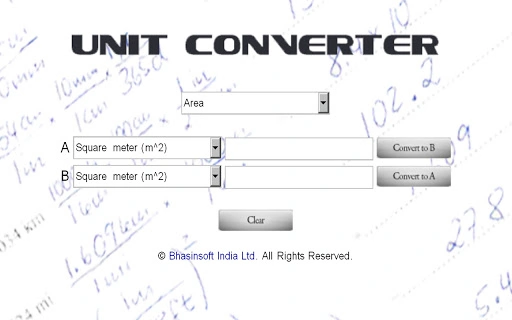
The user interface is structured to prioritize accessibility and ease of navigation, with clearly labeled sections for each conversion category and calculation tool. Users can select a unit type from a dropdown menu, input a value, and instantly receive results in the desired unit. The layout supports quick access to frequently used functions, minimizing the number of clicks required for common tasks. The workflow is linear and intuitive, making it suitable for users with varying levels of technical expertise.
Navigation between the calculator, converter, equation solver, and constants library is seamless, with tab-based or menu-driven access. The interface does not appear to include customizable themes or advanced layout options, suggesting a focus on functionality over visual personalization. Performance observations are based on general software behavior patterns; the application is expected to operate smoothly on modern systems given its relatively small file size of 1.3 MB. The developer did not specify resource usage details, but typical performance for such tools indicates low CPU and RAM consumption during active use.
Stability is likely consistent with standard desktop utilities of this type, though no formal reliability metrics were provided. The software runs as a desktop application, implying it operates independently of browser environments, which may contribute to consistent responsiveness. Users should expect minimal lag during routine operations, though performance may vary depending on system configuration and background processes.
Compatibility & System Requirements
The software is compatible with Chrome OS, Windows, and Mac operating systems, making it accessible to a broad user base across different computing environments. It is available as a desktop application, allowing installation and operation without requiring a web browser. The installation size is 1.3 MB, indicating a lightweight footprint that does not impose significant storage demands.
Exact system requirements were not listed. Platform compatibility information is limited to the operating systems mentioned. The developer did not provide additional system requirements. Hardware requirements, including CPU, RAM, or graphics specifications, were not specified. Users should expect basic compatibility with standard desktop and laptop systems from the era of release, though performance on modern hardware is likely unaffected due to the low resource profile.
Pros and Cons
Pros
- Comprehensive unit conversion across 20+ scientific categories
- Integrated scientific calculator with advanced functions
- Supports base conversion between binary, decimal, octal, and hexadecimal
- Equation solver for linear and polynomial equations
- Access to a built-in library of physical constants
- Free to use with no upfront cost
- Lightweight at just 1.3 MB
- Available on multiple platforms: Chrome OS, Windows, and Mac
Cons
- Ad-supported model may interrupt workflow with occasional ads
- No information on system requirements or hardware compatibility
- Version 1.4 released in 2012; no recent updates or active development signals
- Limited customization options in the user interface
- Not available as a mobile app; restricted to desktop environments
FAQ Section
Is this software available for mobile devices?
The software is designed as a desktop application and is currently available for Chrome OS, Windows, and Mac. There is no mobile version available at this time.
Can I use this tool offline?
Yes, since the software operates as a standalone desktop application, it does not require an internet connection to function after installation.
Is the software safe to download and use?
The software is provided by SoftPas and is free to download. As it is ad-supported, users should be aware of advertisements during use. No security risks were reported in the provided information.
Does the software require an internet connection?
While the software can be used offline after installation, some features may require internet access if they rely on external data sources. However, core functions like unit conversion and calculations operate independently.
What type of license does this software have?
The software is free to use under an ad-supported model. No formal licensing details were provided, but it is intended for personal and educational use.
Final Thoughts + CTA
Unit Converter & Calculator offers a powerful combination of tools in a single lightweight package, making it a valuable resource for students, educators, and technical professionals who need reliable unit conversions and mathematical support. Its integration of a scientific calculator, base converter, equation solver, and physical constants library enhances its utility beyond simple measurement conversion. While the software has not been updated since 2012 and relies on an ad-supported model, its core functionality remains relevant and effective for its intended purposes.
Despite the lack of recent development, the tool continues to serve as a dependable desktop utility for users seeking a free, multi-functional math and conversion solution. Its cross-platform availability and minimal system demands ensure broad accessibility. For those needing a no-cost, all-in-one tool for scientific calculations and unit transformations, this software remains a practical choice.
Download Unit Converter & Calculator now







